Start with a 30-day trial

Make plywood challans, update stock and follow payments from your phone.

quickChallan replaces handwritten challans, loose stock books and manual party ledgers with one Android and web app made for plywood, timber, laminate and hardware shops.

Create clean challan PDFs in minutes and share them on WhatsApp Track 8x4, 7x4, thickness, Sq.Ft, CFT, RFT and Nos stock correctly See party outstanding without checking paper ledgers Record purchases and returns so stock stays updated Start on Android today, continue from web in the office
android Download for Android Book Free Setup
Use quickChallan like an app on iPhone. Open in Safari, tap Share, then Add to Home Screen.
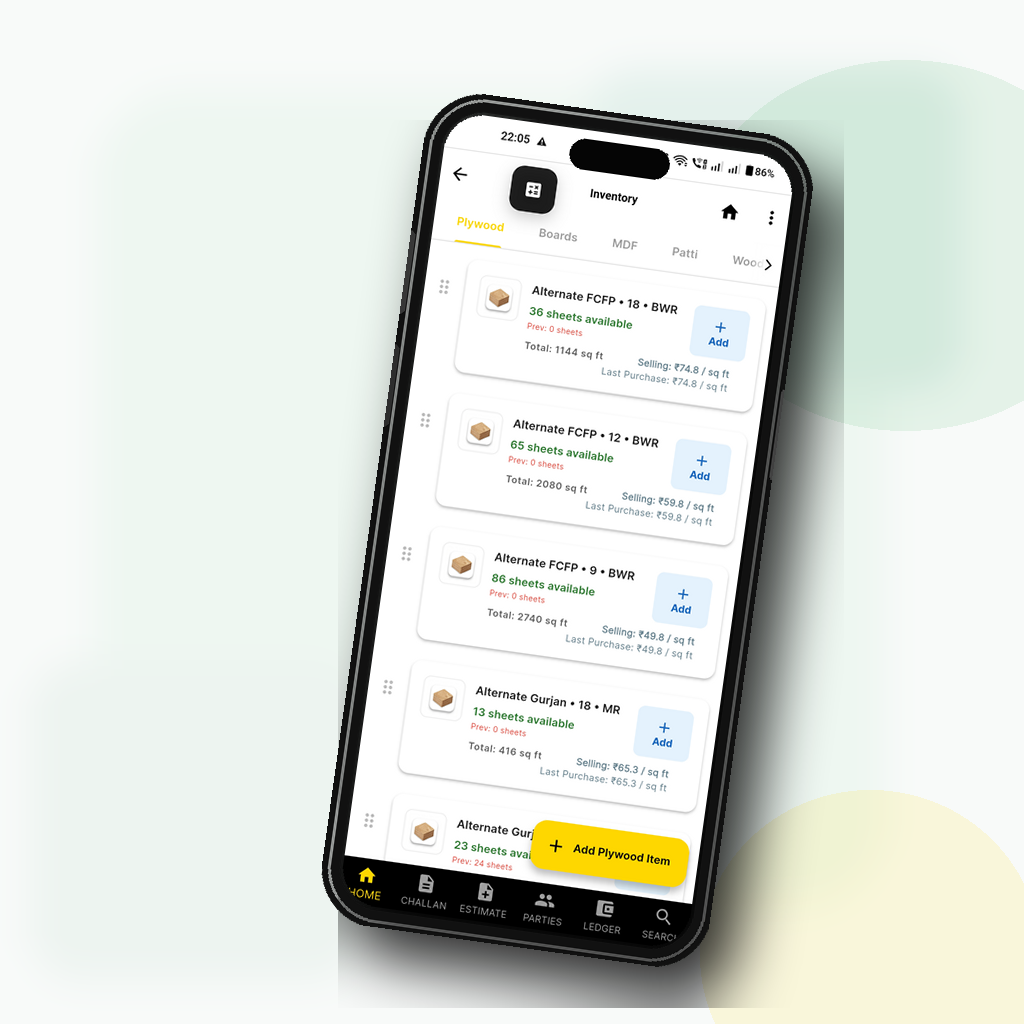
App Mockup
Stop rewriting bills Create challans once, save PDFs and reuse party/item data.
Know stock before selling Check size-wise plywood stock from phone or office.
Follow dues faster Party ledgers show bills, receipts, returns and outstanding.
Free setup help We help your shop create the first party, item and challan.

Why a plywood trader should install it today

quickChallan is built around the daily problems that slow down billing counters, godowns and collection calls.

Your challan becomes a stock entry

When a sale is saved, stock movement and party ledger stay connected. Staff do not need to update three separate notebooks.

  • Sales challan PDF for the customer
  • Stock out by item, size and unit
  • Party outstanding updated for follow-up

Built for plywood sizes, not generic items

Track sheet goods and timber units the way the trade actually works, including size, thickness, alternate quantity and purchase rate.

  • 8x4, 7x4 and custom sheet sizes
  • Sq.Ft, Nos, CFT, RFT and custom units
  • Stock snapshot and stock register PDFs

One app for the work your shop does every day

Start with sales challans, then add stock, party ledger, purchases and reports as your team adopts the system.

receipt_long

Sales Challans and Estimates

Create professional documents with item-wise quantity, rate, billing logic, party details, charges, remarks and ready-to-share PDFs.

shopping_cart_checkout

Purchases, OCR Scan and Debit Notes

Handle inward stock, supplier-side entries and purchase returns cleanly. Scan purchase bills from image/PDF, review extracted fields and save only after confirmation.

assignment_return

Credit Notes and Returns

Reverse sales accurately, return stock to inventory correctly and keep customer-side billing and stock adjustments aligned.

inventory_2

Inventory, Stock Register and Snapshot

Track live stock, FY-wise opening/in/out/closing, movement history and stock snapshot across plywood, laminate, wood, patti, doors and custom products.

account_balance_wallet

Parties, Ledgers and Accounts View

Maintain customer and supplier masters, party ledger flow, payment clarity and account-side visibility without separate manual reconciliation.

assessment

Tally Export and Intelligence

Export structured data for accounting workflows and review purchase intelligence / stock-value insights from the same product.

document_scanner

Purchase Bill Reader

Open the in-app scanner, upload a purchase bill image or PDF, and let OCR prefill the purchase draft. The app asks you to review and edit before saving.

support_agent

Website Chat and Callback Inbox

Visitors can use Talk to team or Request callback on the website. Messages land in the app dashboard so your team can reply from one place.

New: Scan Bills and Reply Faster

Two new workflows reduce manual entry and make website leads easier to handle from the app.

Purchase Bill Scan

Use the in-app camera or upload a document. The bill is processed securely, converted into a structured purchase draft and opened in review mode.

  • Supports purchase bill image/PDF upload
  • Extracts supplier, bill date, item, GST and total fields where readable
  • Never auto-saves scanned data without user confirmation

Website Support Inbox

The website chat now connects to a Firebase-backed inbox. Admins can see visitor messages, reply from the app and handle callback requests.

  • Talk to team and Request callback actions on the website
  • Messages appear inside Website Inbox in the app dashboard
  • Replies are shown back to the visitor in the website chat

Built for Real Trade Units

quickChallan is not a generic invoice template. It is structured around how traders actually sell, buy and count stock.

Sheet Goods

Handle plywood, board, blockboard, MDF and laminate with size-wise variants such as 8x4 and 7x4. Quantities can be viewed in nos and supporting Sq.Ft where needed.

  • Variant-wise stock and pricing
  • Rate by Sq.Ft with document-ready totals
  • Stock Register with movement details and FY carry-forward

Wood, Patti, Doors and Hardware

Use CFT for wood, RFT for patti, Nos for doors, and alternate/base unit combinations for nails, screws, tape, paints and other custom items.

  • Display unit and stock unit support for custom items
  • Door dimensions and area-aware calculations
  • Category-aware stock movement and PDF display

Add Items Without Confusion

The challan add-item flow now follows three clear paths instead of one overloaded form.

01

From Inventory

Select an existing item, choose its variant, get the inventory rate prefilled and edit only the transaction-specific rate, qty or remarks.

02

Add One Time

Create a one-off line item for the document without polluting inventory. It behaves like a valid challan line but does not affect stock.

03

Create New Inventory Item

Open the real inventory creation flow, enter opening stock and date properly, save it, and return straight into challan with the new item selected.

folder_special

Monthly Folders, Ledgers and Export

Organize Sales Challans and Estimates month-wise, follow party ledgers, and export accounting-ready data for Tally-style workflows instead of maintaining scattered records.

Decoration

Made for First-Time Use too

New businesses do not land in a dead-end screen. The app now guides them through the core setup path using the existing module names.

Getting Started on Home

New users see a business-specific checklist that points them to Parties, Inventory and Sales Challans in the right order instead of forcing them to discover everything alone.

  • Progress based on real business data
  • Short first-run intro only when needed
  • No fake completion flags

Contextual Guidance Inside Modules

Parties, Inventory and Sales Challans now show lightweight first-visit guidance and empty-state prompts so new staff can move through setup with less trial and error.

  • Dismissible module tips
  • Direct CTA buttons
  • Better onboarding without renaming modules

Use on Android and Web

Install the Android app directly from the website or log in on the web for office-side work, reporting, PDF generation and account follow-up.

android

Android App

Built for the market floor and godown. Fast billing, stock checks, party handling and document sharing directly from the phone.

Install quickChallan
desktop_windows

Web Login

Open the same business on desktop for data entry, office review, print/PDF work and daily accounting without changing systems.

Open Web Login
For plywood, laminate, wood, patti, doors and hardware trade

Install quickChallan, create your first challan, and see stock/ledger update together.

For the first setup, we can help you add your business, first party, first item and first challan.